




- Comment on the Richard Montague interview here
- Who should be recruited in January? Read this excellent recruitment doc from member ARLukomski
- PoN member McPie asks have we progressed under Martin Paterson? Join the conversation here.
- PoN member theAnticlough poses a new set of questions about the team, click here.
- Notts confirm Belshaw signing
- 👋🏻 Welcome the newest members of Pride of Nottingham! Drop by and say hello, it’s always great to see fresh faces joining the community. 🫱🏼🫲🏼
- 👀 Check out our activity stream to see the latest content as it happens live. Join in with the conversation on Pride of Nottingham.
- Got thoughts on Notts? Share them and help Pride of Nottingham hit its content target! 🏁
- Reply to and read discussions without leaving your screen. Check out the Pride of Nottingham 'Topic Feed', which brings you all the latest content from our community forum in one place.


Chris
-
Joined
-
Last visited
Everything posted by Chris
-
 Notts County's stint in the abyss of non-league began with a 1-0 defeat away at Eastleigh FC which also saw two Magpies players sent off. Although the main issue which gripped the club for the summer - the takeover - was now a memory and a spate of signings was made after the embargo was lifted, the result nonetheless showed that there's a big job at hand on the pitch. Reda Johnson headed Eastleigh in front just before the quarter-hour mark after getting on the end of Jack Payne's corner, and although Notts had chances to level things up, they could not find a way past home goalkeeper Max Stryjek. Shortly after a block by Johnson thwarted Nathan Tyson, the Magpies were reduced to 10 men when Michael Doyle was sent off, and debutant Damien McCrory followed his teammate down the tunnel in stoppage-time. Pride of Nottingham was at the Silverlake Stadium for Notts County's season opener against Eastleigh. See if you're in this week's faces of PON. Share your thoughts about this preview on Pride of Nottingham by signing up to the website, visiting the forum and joining in the chat with hundreds of fellow Notts County fans. Fancy showcasing your brand or business on Pride of Nottingham? Click here to find out more about sponsorship and advertising opportunities with us.
-

From the album: Faces of PON: Eastleigh FC vs. Notts County, Saturday 3rd August 2019
© Copyright the Pride of Nottingham 2019
-

From the album: Faces of PON: Eastleigh FC vs. Notts County, Saturday 3rd August 2019
© Copyright the Pride of Nottingham 2019
-
Pride of Nottingham was at the Silverlake Stadium for Notts County's season opener against Eastleigh. See if you're in this week's faces of PON. #Notts #FacesofPON #COYP
-

From the album: Faces of PON: Eastleigh FC vs. Notts County, Saturday 3rd August 2019
© Copyright the Pride of Nottingham 2019
-

From the album: Faces of PON: Eastleigh FC vs. Notts County, Saturday 3rd August 2019
© Copyright the Pride of Nottingham 2019
-

From the album: Faces of PON: Eastleigh FC vs. Notts County, Saturday 3rd August 2019
© Copyright the Pride of Nottingham 2019
-

From the album: Faces of PON: Eastleigh FC vs. Notts County, Saturday 3rd August 2019
© Copyright the Pride of Nottingham 2019
-

From the album: Faces of PON: Eastleigh FC vs. Notts County, Saturday 3rd August 2019
© Copyright the Pride of Nottingham 2019
-

From the album: Faces of PON: Eastleigh FC vs. Notts County, Saturday 3rd August 2019
© Copyright the Pride of Nottingham 2019
-

From the album: Faces of PON: Eastleigh FC vs. Notts County, Saturday 3rd August 2019
© Copyright the Pride of Nottingham 2019
-

From the album: Faces of PON: Eastleigh FC vs. Notts County, Saturday 3rd August 2019
© Copyright the Pride of Nottingham 2019
-

From the album: Faces of PON: Eastleigh FC vs. Notts County, Saturday 3rd August 2019
© Copyright the Pride of Nottingham 2019
-
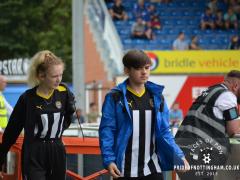
From the album: Faces of PON: Eastleigh FC vs. Notts County, Saturday 3rd August 2019
© Copyright the Pride of Nottingham 2019
-

From the album: Faces of PON: Eastleigh FC vs. Notts County, Saturday 3rd August 2019
© Copyright the Pride of Nottingham 2019
-

From the album: Faces of PON: Eastleigh FC vs. Notts County, Saturday 3rd August 2019
© Copyright the Pride of Nottingham 2019
-

From the album: Faces of PON: Eastleigh FC vs. Notts County, Saturday 3rd August 2019
© Copyright the Pride of Nottingham 2019
-

From the album: Faces of PON: Eastleigh FC vs. Notts County, Saturday 3rd August 2019
© Copyright the Pride of Nottingham 2019
-

From the album: Faces of PON: Eastleigh FC vs. Notts County, Saturday 3rd August 2019
© Copyright the Pride of Nottingham 2019
-

From the album: Faces of PON: Eastleigh FC vs. Notts County, Saturday 3rd August 2019
© Copyright the Pride of Nottingham 2019
-

From the album: Faces of PON: Eastleigh FC vs. Notts County, Saturday 3rd August 2019
© Copyright the Pride of Nottingham 2019
-

From the album: Faces of PON: Eastleigh FC vs. Notts County, Saturday 3rd August 2019
© Copyright the Pride of Nottingham 2019
-

From the album: Faces of PON: Eastleigh FC vs. Notts County, Saturday 3rd August 2019
© Copyright the Pride of Nottingham 2019
-

From the album: Faces of PON: Eastleigh FC vs. Notts County, Saturday 3rd August 2019
© Copyright the Pride of Nottingham 2019
-

From the album: Faces of PON: Eastleigh FC vs. Notts County, Saturday 3rd August 2019
© Copyright the Pride of Nottingham 2019