



- Comment on the Richard Montague interview here
- Who should be recruited in January? Read this excellent recruitment doc from member ARLukomski
- PoN member McPie asks have we progressed under Martin Paterson? Join the conversation here.
- PoN member theAnticlough poses a new set of questions about the team, click here.
- Notts confirm Belshaw signing
- 👋🏻 Welcome the newest members of Pride of Nottingham! Drop by and say hello, it’s always great to see fresh faces joining the community. 🫱🏼🫲🏼
- 👀 Check out our activity stream to see the latest content as it happens live. Join in with the conversation on Pride of Nottingham.
- Got thoughts on Notts? Share them and help Pride of Nottingham hit its content target! 🏁
- Reply to and read discussions without leaving your screen. Check out the Pride of Nottingham 'Topic Feed', which brings you all the latest content from our community forum in one place.

PON_News
Administrators
-
Joined
-
Last visited
Everything posted by PON_News
-
 Interview: Wootton on Torquay preparations
 -
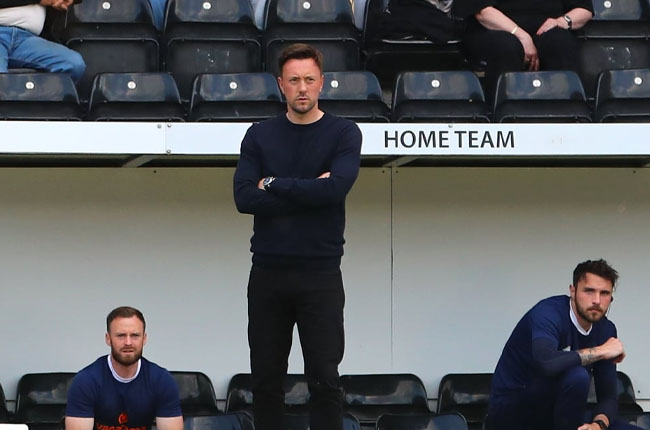 Notts County head coach Ian Burchnall has urged his side to refocus for upcoming game against Torquay in the magpies' bid to regain their place in the English Football League. The Magpies take a trip to Torquay on Saturday in the 2nd stage of the National League play-offs. It follows a dramatic late 3-2 sway over Chesterfield at Meadow Lane. Speaking to BBC Radio Nottingham, Burchnall said: "They are a very good team, they nearly won the league, but finished second - they ran it really close "We know they've got a lot of quality. We really have to focus now, we have to bring ourselves down and refocus on the next game." The magpies' are now one game away from another trip to the National League Playoff finals at Ashton Gate after Mark Ellis racked up a last-minute goal to provide victory over Chesterfield in a game which saw them three times score after going behind twice in the match. The defender has scored six goals in 20 games since arriving at Meadow Lane from Tranmere Rovers in March. "He's got a massive head." Burchnall joked before adding: "He's brave, he puts his head on everything. He doesn't mind getting his face smashed in. He's been magnificent." Ellis was born in Devon and also made greater than 130 appearances for Torquay earlier in his profession. "They're a former club, but there's only one thing on my mind and that's to go there and win and get us to the final," the 32-year-old said. Burchnall believes the character revealed by his group of players since arriving as manager, 12 days after Ellis' arrival at the club has been vital. "We have it in the group. I saw it when I first came in. "We just needed to believe in what we were doing a little bit more, we just needed to believe in what we were doing a little bit more, We turned a corner a while back and they've not looked back since then." Share your thoughts of this topic within the Pride of Nottingham by signing up to the website, visiting the forum and joining in the chat with hundreds of fellow Notts County fans. Fancy showcasing your brand or business on Pride of Nottingham? Click here to find out more about sponsorship and advertising opportunities with us.
 -
 Goals: Notts County v Chesterfield
 -
 Matchday Moments: Chesterfield (H)
 -
 Post-Chesterfield: Mark Ellis
 -
 Post-Chesterfield: Ian Burchnall
 -
 Interview: Burchnall previews Chesterfield encounter
 -
 Pre-Chesterfield: Connell Rawlinson
 -
 Pre-Chesterfield: Ian Burchnall
 -
 Post-Bromley: Sam Slocombe
 -
 Post-Bromley: Ian Burchnall
 -
-
 Pre-Bromley: Richard Brindley
 -
 Pre-Bromley: Ian Burchnall
 -
-
Game 46 - The Lilywhites (A) Team: Bromley Date: 29/05/2021 Where: Hayes Lane What line-up should Ian Burchnall opt for? What will be the key areas for the Magpies to get a victory? What do you think the final score will be? Have your say below, join in with the Pride of Nottingham match discussion.
-
 Goals: Notts County v Weymouth
 -
 Fans return to Meadow Lane
 -
 Post-Weymouth: Ian Burchnall
 -
 Post-Weymouth: Kyle Wootton
 -
-
 Pre-Weymouth: Ian Burchnall
 -
 Pre-Weymouth: Michael Doyle
 -
 Goal: Wrexham v Notts County
 -
Game 45 - The Terras (H) Team: Weymouth Date: 22/05/2021 Where: Meadow Lane What line-up should Ian Burchnall opt for? What will be the key areas for the Magpies to get a victory? What do you think the final score will be? Have your say below, join in with the Pride of Nottingham match discussion.