




- Comment on the Richard Montague interview here
- Who should be recruited in January? Read this excellent recruitment doc from member ARLukomski
- PoN member McPie asks have we progressed under Martin Paterson? Join the conversation here.
- PoN member theAnticlough poses a new set of questions about the team, click here.
- Notts confirm Belshaw signing
- 👋🏻 Welcome the newest members of Pride of Nottingham! Drop by and say hello, it’s always great to see fresh faces joining the community. 🫱🏼🫲🏼
- 👀 Check out our activity stream to see the latest content as it happens live. Join in with the conversation on Pride of Nottingham.
- Got thoughts on Notts? Share them and help Pride of Nottingham hit its content target! 🏁
- Reply to and read discussions without leaving your screen. Check out the Pride of Nottingham 'Topic Feed', which brings you all the latest content from our community forum in one place.

Piethagoram
Global Moderators
-
Joined
-
Last visited
Everything posted by Piethagoram
-
@Fan of Big Tone you need to be at the 4 front????
-
Wordle 888 4/6 ⬜????⬜⬜⬜ ????????⬜???????? ????????????????⬜ ????????????????????
-
Wordle 887 3/6 ⬜⬜⬜⬜???? ⬜????⬜????⬜ ????????????????????
-
Wordle 886 4/6 ⬜⬜????⬜???? ⬜????????????⬜ ⬜????????????⬜ ????????????????????
-
Wordle 885 3/6 ????⬜????⬜⬜ ????????????????⬜ ????????????????????◾◽
-
Wordle 884 4/6 ????⬜⬜⬜⬜ ????⬜⬜????⬜ ⬜???????????????? ????????????????????
-
Testing intelligence in the eye, maybe????
-
Wordle 883 4/6 ⬜⬜⬜⬜???? ⬜⬜????⬜⬜ ????⬜⬜???????? ????????????????????
-
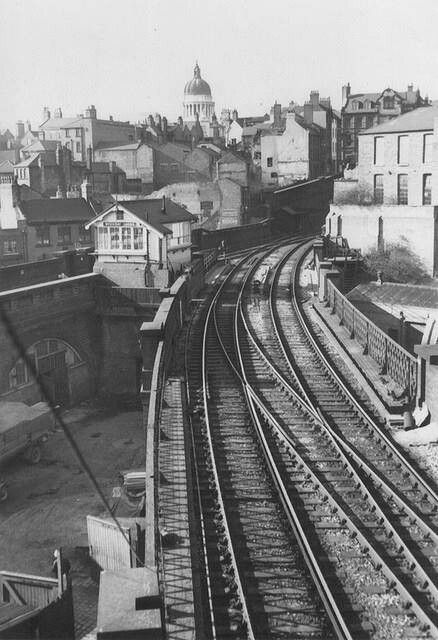
@ChrisTo the right of the viaduct is Broad Marsh, the railway coming in on the left was from London Road High Level station. The tram takes the straight formation, on a new viaduct, now towards Nottingham Midland station The camera position is to the right of the tunnel portal, taking the line into Victoria station Weekday Cross as is, is over the immediate tunnel entranceWordle 882 3/6 ⬜⬜????⬜⬜ ????????????????⬜ ????????????????????Wordle 881 3/6 ????????⬜⬜⬜ ????⬜⬜????⬜ ????????????????????Wordle 880 3/6 ⬜????⬜????⬜ ⬜????????????⬜ ???????????????????? days at Notts maybeToday's Wordle answer isn't CREWE ???????? Sorry @super_rammy friendWordle 879 3/6 ⬜⬜????????⬜ ????⬜⬜???????? ????????????????????Wordle 878 4/6 ????⬜⬜????⬜ ????⬜???????????? ⬜???????????????? ????????????????????Wordle 877 4/6 ⬜????⬜⬜???? ⬜????⬜⬜⬜ ⬜????????????⬜ ????????????????????✅No problem @allardyces tash. I am a long standing advocate on this board that our defence is no where near good enough, having been promoted with the 2nd worst defence in the NL last season, based on the 30% of the time we didn't have the ball. Aside from our defence, both our main keepers are making too many mistakes. I am a strong supporter that Tiernan Brooks gets his chance nowWordle 876 3/6 ????⬜⬜⬜???? ????????????????⬜ ????????????????????Re @Dripsey3 "The referee pulls a hamstring"... just when Macca could have a through run on goal Penalty harsh as the ball is hit at Jodi...but Slocombe really at fault.... and he never saves penaltiesWordle 875 4/6 ????????⬜⬜⬜ ⬜????⬜????⬜ ????⬜???????????? ???????????????????? MullenWordle 874 3/6 ????⬜⬜???????? ⬜????????????⬜ ????????????????????Wordle 873 6/6 ????⬜⬜⬜???? ⬜⬜⬜⬜???? ⬜???????????????? ????????????⬜???? ????????????⬜???? ????????????????????



Important Information
Pride of Nottingham uses cookies to ensure you get the best experience on our website. To approve, simply continue using the site or click 'I accept' Terms of Use.
Account
Navigation
Search
Configure browser push notifications
Chrome (Android)
- Tap the lock icon next to the address bar.
- Tap Permissions → Notifications.
- Adjust your preference.
Chrome (Desktop)
- Click the padlock icon in the address bar.
- Select Site settings.
- Find Notifications and adjust your preference.
Safari (iOS 16.4+)
- Ensure the site is installed via Add to Home Screen.
- Open Settings App → Notifications.
- Find your app name and adjust your preference.
Safari (macOS)
- Go to Safari → Preferences.
- Click the Websites tab.
- Select Notifications in the sidebar.
- Find this website and adjust your preference.
Edge (Android)
- Tap the lock icon next to the address bar.
- Tap Permissions.
- Find Notifications and adjust your preference.
Edge (Desktop)
- Click the padlock icon in the address bar.
- Click Permissions for this site.
- Find Notifications and adjust your preference.
Firefox (Android)
- Go to Settings → Site permissions.
- Tap Notifications.
- Find this site in the list and adjust your preference.
Firefox (Desktop)
- Open Firefox Settings.
- Search for Notifications.
- Find this site in the list and adjust your preference.