


- Comment on the Richard Montague interview here
- Who should be recruited in January? Read this excellent recruitment doc from member ARLukomski
- PoN member McPie asks have we progressed under Martin Paterson? Join the conversation here.
- PoN member theAnticlough poses a new set of questions about the team, click here.
- Notts confirm Belshaw signing
- 👋🏻 Welcome the newest members of Pride of Nottingham! Drop by and say hello, it’s always great to see fresh faces joining the community. 🫱🏼🫲🏼
- 👀 Check out our activity stream to see the latest content as it happens live. Join in with the conversation on Pride of Nottingham.
- Got thoughts on Notts? Share them and help Pride of Nottingham hit its content target! 🏁
- Reply to and read discussions without leaving your screen. Check out the Pride of Nottingham 'Topic Feed', which brings you all the latest content from our community forum in one place.


Robbie
+Supporters
-
Joined
-
Last visited
Subscriber
Subscriber
Everything posted by Robbie
-
#waffle1467 3/5 🟩🟩🟩🟩🟩 🟩⭐🟩⬜🟩 🟩🟩⭐🟩🟩 🟩⬜🟩⭐🟩 🟩🟩🟩🟩🟩 🔥 streak: 134 🌟 #wafflecenturion wafflegame.net
-
Wordle 1,683 3/6 ⬜🟨⬜⬜🟨 🟩🟩🟩⬜🟩 🟩🟩🟩🟩🟩
-
The Poll has now closed. Thanks to all who voted. I'm pleased to announce that Tom Iorpenda has been voted the Pride of Nottingham's Man of the Match against Crewe. Well done Tom.
-
On paper he looks a very good signing for Notts. He will need to deal with the physicality of League 2. This is where Football Radar comes in to its own, & the Club must be confident he can do a job for them. It may take him a few weeks to acclimatise, so we will just have to see how he adjusts once he gets up to speed. Notts do have plenty of cover in the AM now, Nilsen, Iorpenda, Grant, Hall, Jones & Luker when he returns. We also have Dennis who can play behind Jatta. There is a lot of competition now in this area of the pitch & players will be fighting for a place, but if Harald can make the number 10 his own, Notts will be in a great place up to the end of the season.
-
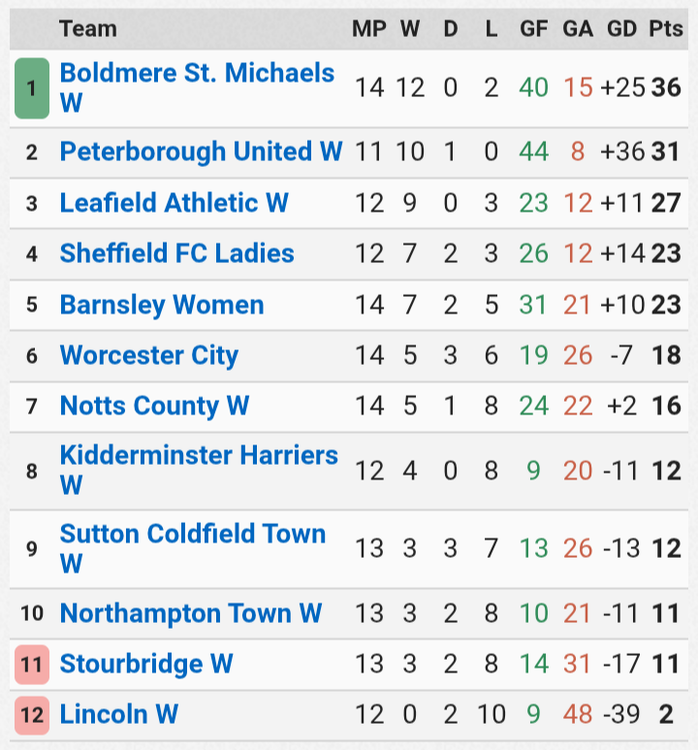
Update to date League Table.
-
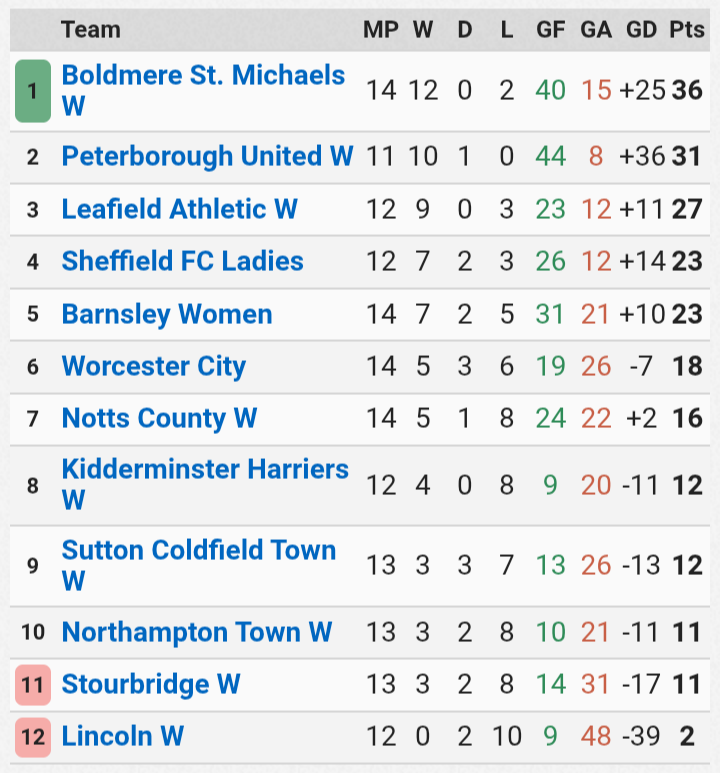
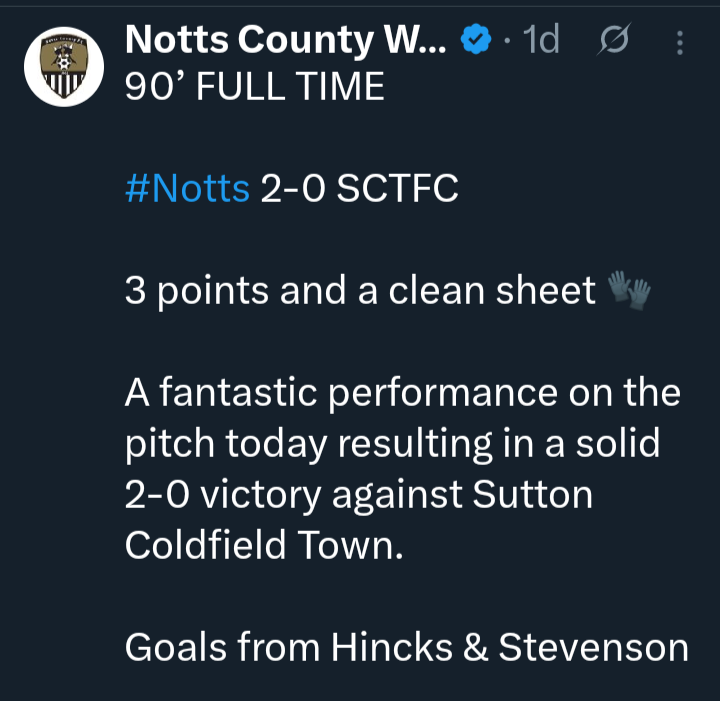
A welcome away win for Notts Country Women against Sutton Coldfield Town on Sunday.
-
Unfortunately Notts were never going to compete wage wise. My money is on him going to Peterborough because he would join up with Luke Williams again. I hope now that we are getting to the last week of the window Notts will refuse any bids for Jatta or anyone else of value to Notts.
-
Another massive game on Tuesday evening for Notts against one of the leading sides in League 2. Swindon were beaten by league leaders Bromley on Saturday. They now have three defeats in their last five league games, however Notts will be preparing for a very tough game & they will be aware of how dangerous Swindon can be. Under Ian Holloway, Swindon have shown the ability to adapt from a patient attacking game to quick counter attacking football, while also displaying an attacking flair that has seen them score high numbers of goals, so Notts will need to be on the ball defensively. Notts played very well against Crewe & I expect Head Coach Martin Paterson will select an unchanged side on Tuesday. New signing Lee Ndlovu will probably be on the bench, which will give Martin different options at some point upfront. I think that Notts need to pressure Swindon from the beginning like they did against Crewe & try to get an early goal which would be so important. There will be times when Notts comes under pressure & they need to remain solid. A third league win in a row for Notts would help them overtake Swindon in the table & would challenge for a top three position if results went Notts's way. I do believe that Notts can get the win, but they need to be at their best. Consistency is the key. Notts have demonstrated how well they can play at times & if they play at their best they can beat any team in this league. But they need to be able to play consistently well at a high level.
-
Connections Puzzle #960 🟨🟨🟨🟨 🟦🟦🟦🟦 🟩🟩🟪🟩 🟩🟩🟩🟩 🟪🟪🟪🟪
-
#waffle1466 5/5 🟩🟩🟩🟩🟩 🟩⭐🟩⭐🟩 🟩🟩⭐🟩🟩 🟩⭐🟩⭐🟩 🟩🟩🟩🟩🟩 🔥 streak: 133 🌟 #wafflecenturion wafflegame.net
-
Strands #694 “Grape expectations” 💡🔵💡🔵 💡🔵🟡🔵 🔵
-
Wordle 1,682 4/6 🟨⬜⬜🟨⬜ ⬜🟨🟨🟨🟨 ⬜🟩🟩🟩🟩 🟩🟩🟩🟩🟩
-
Strands #693 “The straight and narrow” 🔵🔵🟡🔵 🔵🔵🔵🔵
-
Connections Puzzle #959 🟨🟨🟨🟨 🟩🟩🟩🟩 🟪🟪🟪🟪 🟦🟦🟦🟦
-
#waffle1465 4/5 🟩🟩🟩🟩🟩 🟩⭐🟩⭐🟩 🟩🟩🟩🟩🟩 🟩⭐🟩⭐🟩 🟩🟩🟩🟩🟩 🔥 streak: 132 🌟 #wafflecenturion wafflegame.net
-
Wordle 1,681 3/6 ⬜⬜⬜⬜🟨 🟩🟩🟨⬜⬜ 🟩🟩🟩🟩🟩
-
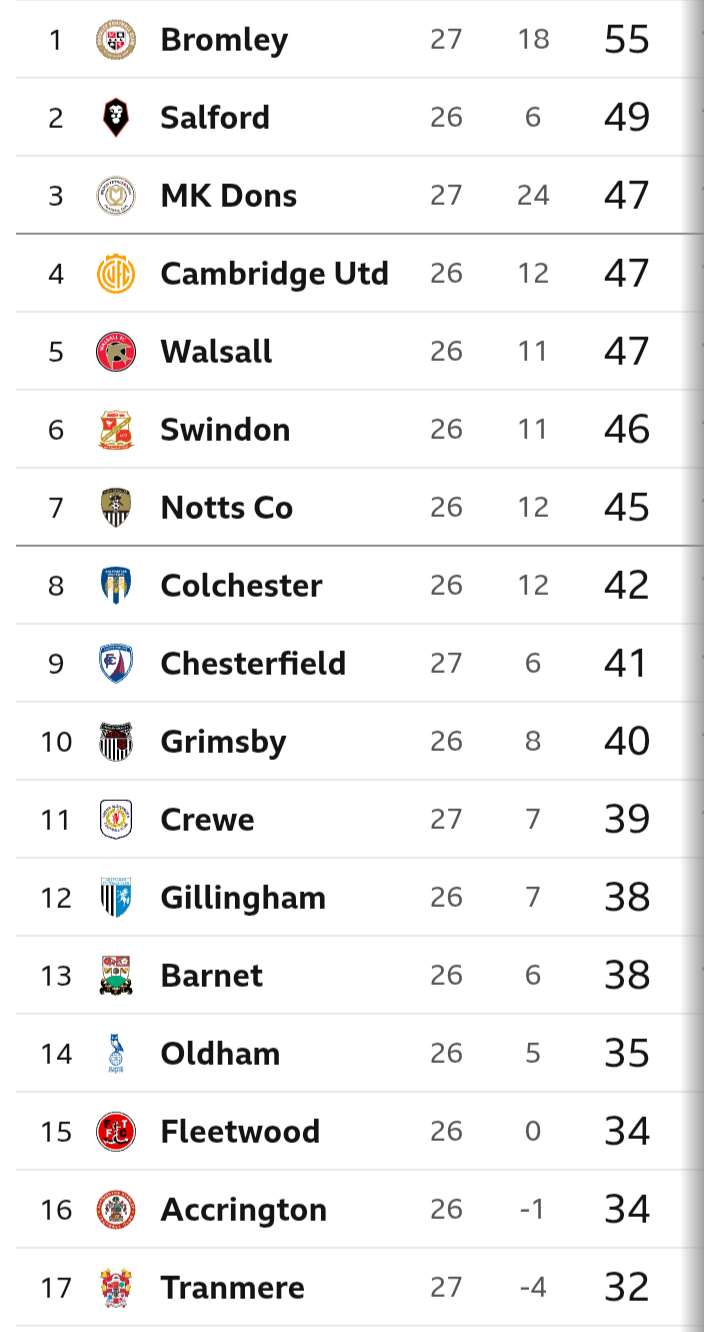
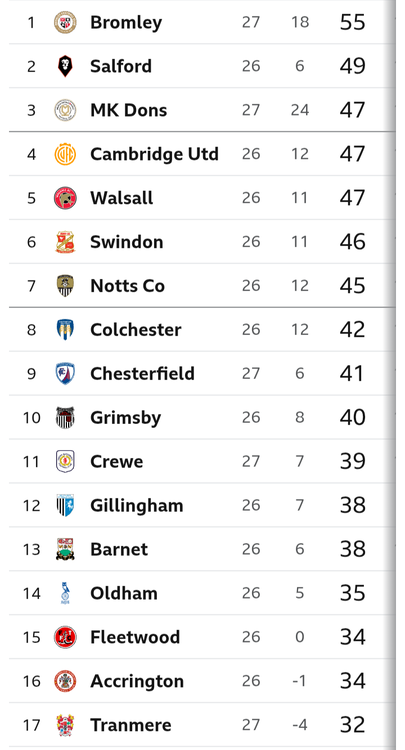
This is the League 2 Table after today's games. Notts are in 7th place.
-
It was a brilliant performance from the team today. Our defence midfield all did well, & the subs that came on didn't let the team down. If I was going to pick my Man of the Match it would be Tom Iorpenda. He seems to get better & better & I think that he's even a great loan capture just like George Abbot was last season.
-
A very good performance by Notts today. A clean sheet for James Belshaw & a vital win for Notts. It was a game where Notts created numerous chances & the final score of 1:0 to Notts could have easily have been four or five to nil. So who stood out for you today for Notts? I have chosen the starting eleven for you to choose your Man of the Match for Notts today. Those players are: Belshaw, Macari, Platt, Bedeau, Jones, Palmer, Norburn, Tsaroula, Grant, Iorpenda, Jatta.
-
UpdateA deserve win for Notts Final scoreNotts 1 - 0 Crewe

-
Update (86) Ness replaces Macari Notts 1 - 0 Crewe
-
Update(76) Dennis replaces Jatta. Notts 1 - 0 Crewe
-
Update (64) Hall and Kouhyar replace Grant and Jones Notts 1 - 0 Crewe
-
Update (59) Another great move results in Macari's shot taking a slight deflection & flashing inches wide! Notts 1 - 0 Crewe
-
Update (53) Jones and Grant link up brilliantly down the left and the latter lays it off for Jatta, who can't beat Lawlor from 12 yards. Notts 1 - 0 Crewe