




- Comment on the Richard Montague interview here
- Who should be recruited in January? Read this excellent recruitment doc from member ARLukomski
- PoN member McPie asks have we progressed under Martin Paterson? Join the conversation here.
- PoN member theAnticlough poses a new set of questions about the team, click here.
- Notts confirm Belshaw signing
- 👋🏻 Welcome the newest members of Pride of Nottingham! Drop by and say hello, it’s always great to see fresh faces joining the community. 🫱🏼🫲🏼
- 👀 Check out our activity stream to see the latest content as it happens live. Join in with the conversation on Pride of Nottingham.
- Got thoughts on Notts? Share them and help Pride of Nottingham hit its content target! 🏁
- Reply to and read discussions without leaving your screen. Check out the Pride of Nottingham 'Topic Feed', which brings you all the latest content from our community forum in one place.
Leaderboard
-
- All areas
- Fixtures
- Comments
- Quizzes
- Quiz Comments
- Quiz Reviews
- Status Updates
- Status Replies
- Videos
- Video Comments
- Video Reviews
- Topics
- Posts
- Events
- Event Comments
- Images
- Image Comments
- Albums
- Album Comments
- Blog Entries
- Blog Comments
- Articles
- Article Comments
- Wallpapers
- Wallpaper Comments
- Records
- Record Comments
- Record Reviews
-
Member Leaders
-

Robbie
+Supporters39Points17,593Posts -
theAnticlough
Members23Points1,012Posts -
nottsnutter
Members22Points532Posts -
Michael D Pie.
+Supporters19Points484Posts



More entries
-
McPie
Members13Points317Posts -
Graham
Members12Points56Posts -
menzinho
Members11Points2,017Posts -
Sheffield Pie
Members6Points188Posts -
Paris Sandwich Man
Members5Points103Posts




Team Leaders
-
Fan of Big Tone
Global Moderators31Points15,760Posts -
StarkMallard
Global Moderators15Points6,533Posts -
Chris
Administrators12Points32,369Posts -
Piethagoram
Global Moderators8Points12,591Posts



Popular Content
Showing content with the highest reputation since 10/09/26 in all areas
-
5 pointsI think that the awarding of a new contract is well deserved. Martin has joined a list of Notts County Managers that have done wonders for this club over the years. I think that the vast number of Notts supporters will be very pleased that he has put pen to paper. The owners have shown that they have confidence in him to possibly take this club to the next level. This year may be a year of consolidation, but I wouldn't be surprised to see Notts challenging for promotion under his leadership at some stage in the near future.5 points
-
Had to be Finneran, even though he was puffing out of his backside and had took some big knocks during the game. Both flank players disappeared during the game, No penetration when Hindolo went off, also thought the bite from Evans was missing towards the end. Roberts looked like a National League player, completely lost. Too many astray passes during the game from every player handed the impetus to the Bantams. We made Aden look like Virgil. Even Belly’s kicking had no end product. We are still learning about promotion, nothing regards bubbles burst from me. We will play worse and win games. Keep cherishing where we are and where we could get to.5 points
-
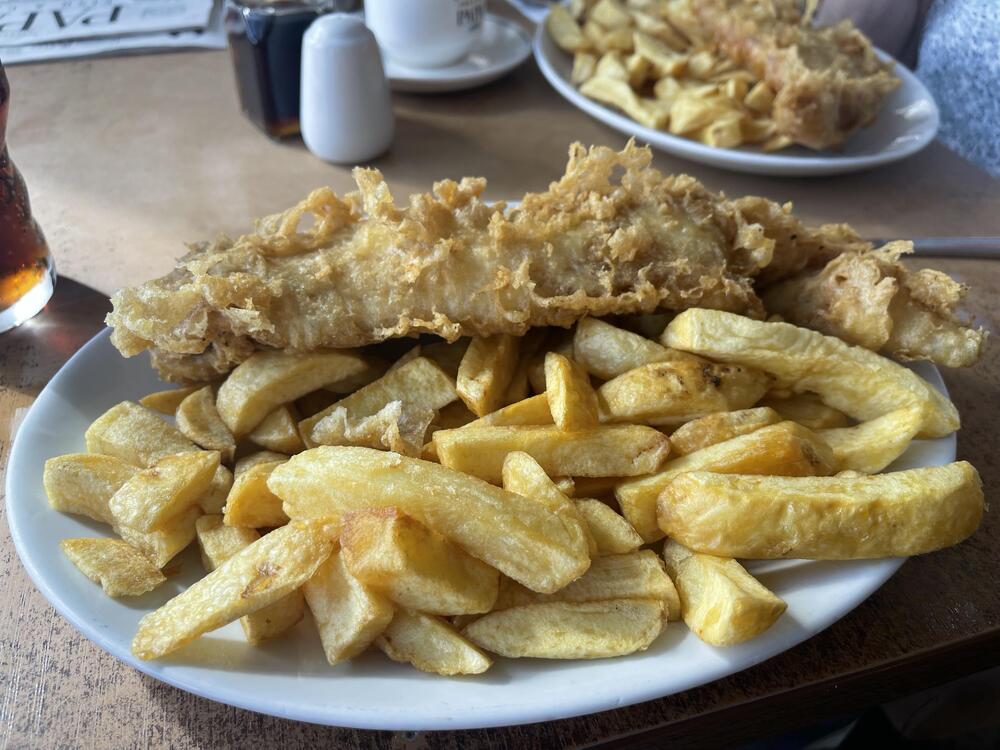
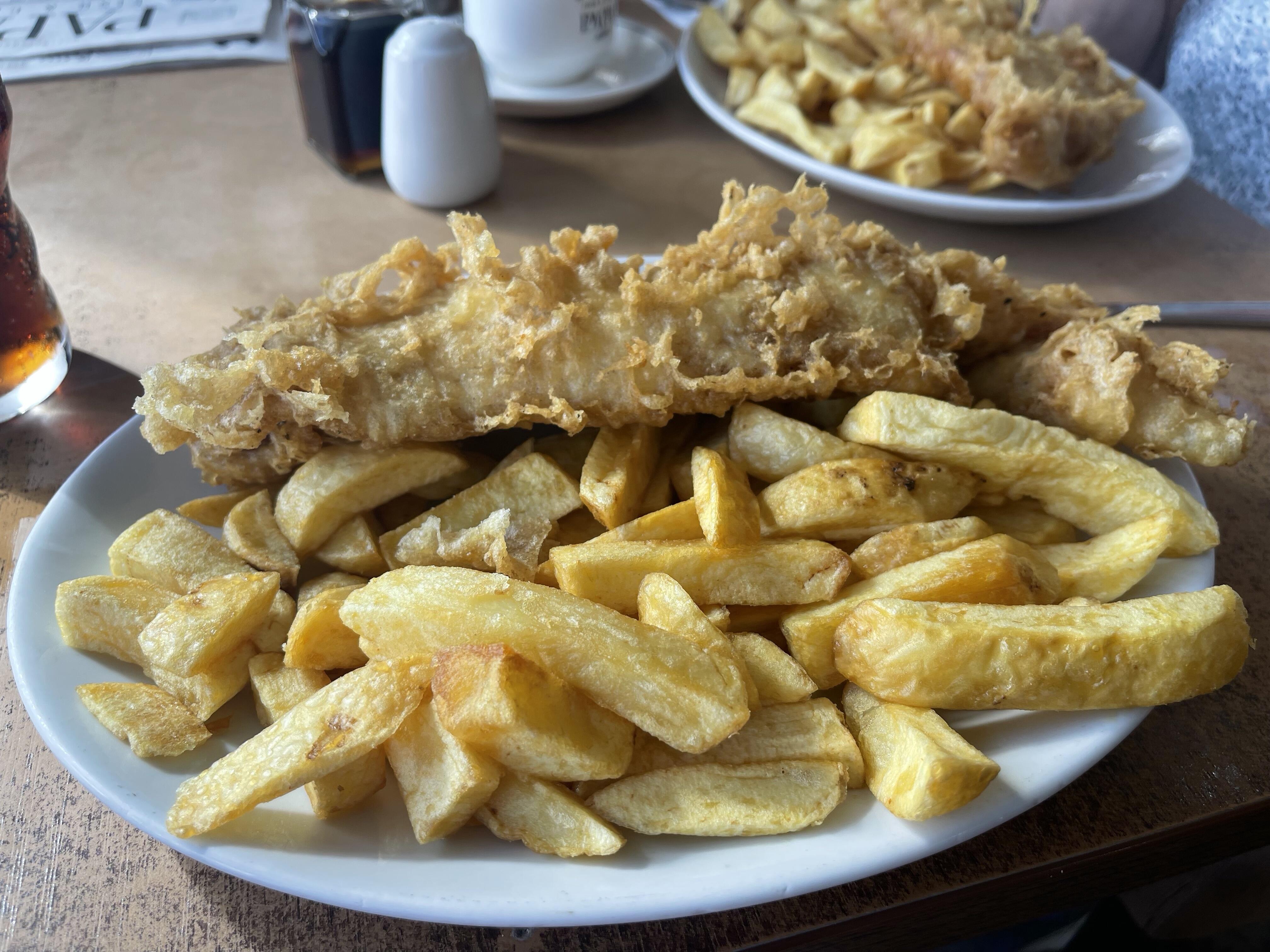
When you visit the seaside you have to have fish and chips it’s the law!
 4 points
 -
That sounds like a profession I could of enjoyed, good luck to him, then world is his oyster once graduated 🎓 👍 Apple crumble and custard is a must, it's sacrilege to have it without, my Mother would turn in her grave if she knew i was having it without. 😵💫 Care is a commodity that's well founded and something to cherish. Happy Birthday @ARLukomski have a great time in London. 4 day working week is the future, I did it for nearly 30 years and enjoyed every minute. @Piethagoram good business done there, enjoy the trip. We love Eurostar and have been to Paris on it, had a great time. Managed to upgrade on the outward journey, living like Lord and Lady Pie. 🤴👸 Nice one @Fan of Big Tone you and Mrs T look well settled, Carry on and you will need a crane to get the pair of you out when the bubbly hits the right spot. Enjoy the rest of your break. 🥳🍾🥂4 points
-
In London for the day with @Megan_Elizax for my 27th. Then working all week. 4 day working weeks >4 points
-
I thought Jacob Bedeau was one of our steadier performers defensively and looked composed despite Bradford putting us under pressure. Bedeau had a really solid game — strong defensively and one of the few County players who looked consistently composed. I must admit Finneran came a close second, making himself available, with the skill set of a seasoned pro and the nous to put things into practice, great game and a positive future.4 points
-
Finneran for me, up to half time thought was going to be close between Mustapha and Finneran but until he was substituted Mustapha looked a shadow of his 1st half performance. Again for an 18 year old he again showed great composure, brilliant touches and unlucky with his strike towards the end. Again Ness put in a proper shift, it has been the first time I feel the subs made by MP failed to make a real impact.4 points
-
I'll kick this off... Ness and Bedeau did fine. As did a couple of players we took off on the hour - Mustapha and Lipsiuc. Longelo was the best of the subs. I'll vote for Finneran though. He's always showing. Doesn't always get it right but for the most part his passing and positioning is excellent.4 points
-
Considering some of the teams last season I still thought we were one of the better footballing sides, but the difference was we were more flexible. Take the play-offs, we were kind of happy to let Chesterfield have the ball because we’d worked on the out of possession shape and we knew we could create chances from pressing. Then in the final, given it was 30°+ it’s virtually impossible to play an effective press so we switched back to a more possession-based style. Salford were very much an up and at you team under Robinson and they didn’t adapt. Now we aren’t side the is 100% committed to trying to always have possession of the ball, we can be just as effective without it. It’s a double edge sword, but in a good way for us! Against Huddersfield we were more focused in our out of possession play and we came away with a point. Against Burton home (second half) we showed we are still capable of dominating the ball and creating chances through good passing play. It’s the best of both worlds right now and I think it’s going to serve us well this season.4 points
-
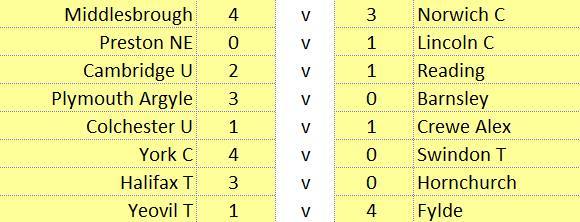
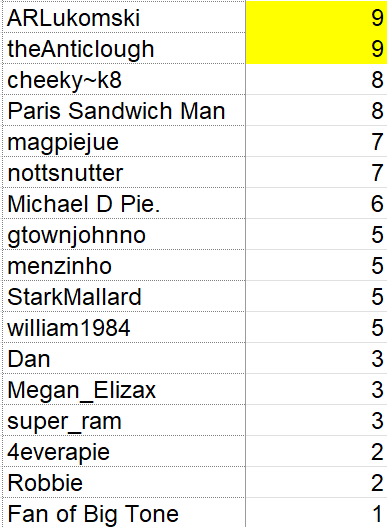
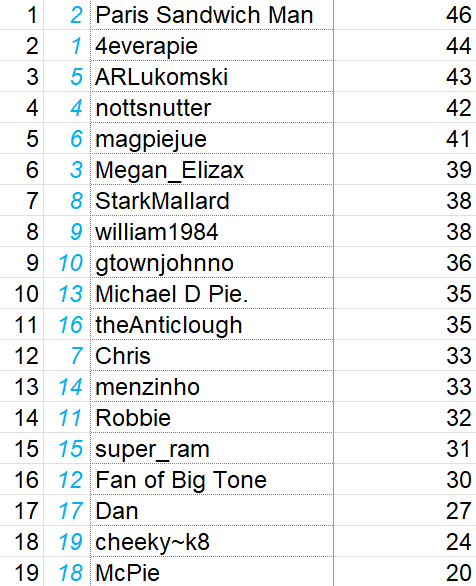
3 points3 points3 pointsThis is great news. The fans forum is also an interesting watch (recording is on the Notts website) not least for what MP said about his expectations of players, why Ness has emerged as a top talent, and possession stats. Although I've said we're capable of making the play-offs, in terms of progress in the next three years, all I'm looking for is being competitive in EFL1 for now. Just as important for me is the club becoming 'Championship ready' in other ways - building up the average attendance to 15k+, getting a big name sponsor, buying and selling for bigger fees (looking forward to our first £1m sale), being able to incorporate outside investment into the model.3 points3 pointsWe saw last night in the fans forum why the owners see giving Martin a new contract is good business. The good form of Lucas Ness was raised by a fan in the audience and highlighted how the dynamic with Martin and the recruitment teams works. With their data they bring the raw talent, the rough diamonds so to speak and Martin works with them so as to improve and to make them better players. We have signed a few this summer, so the future looks bright!3 pointsMorning all, it’s going to be a lovely day with temperatures reaching a possible 24 degrees. ☀️ We are setting off for our short break in a lodge, we’ll stop off at Lincoln to have a mooch round and maybe grab a bit of lunch before getting to the lodge which is in the grounds of a spa resort. The pictures look great so we are looking forward to it. Have a great day everyone.3 points3 pointsFair enough @Robbie. Preston and Burnley could blow us out of the water financially and pay any compensation we demand, but I can't really see Burnley wanting him at this stage. It's probably more about securing his services for the time being and putting us in a better position to benefit financially if and when he does leave (hopefully not soon).3 pointsThe results: @ARLukomski and @theAnticlough take the glory this round! Honourable mentions too to @cheeky~k8 and @Paris Sandwich Man. There's change at the top! @Paris Sandwich Man overtakes @4everapie to claim top spot, while @ARLukomski goes third and I surge into a glorious seventh place, which is much cooler anyway. I'll post Saturday's fixtures on Wednesday (tomorrow at the time of writing). Thanks for playing!
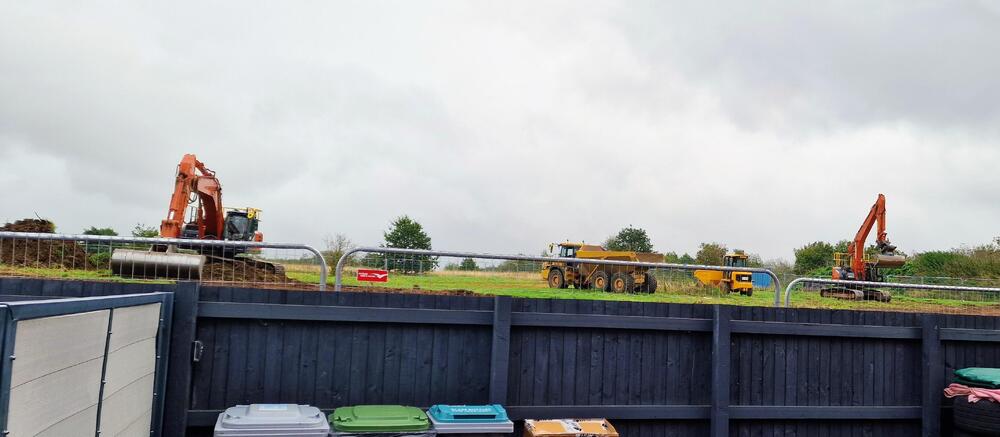
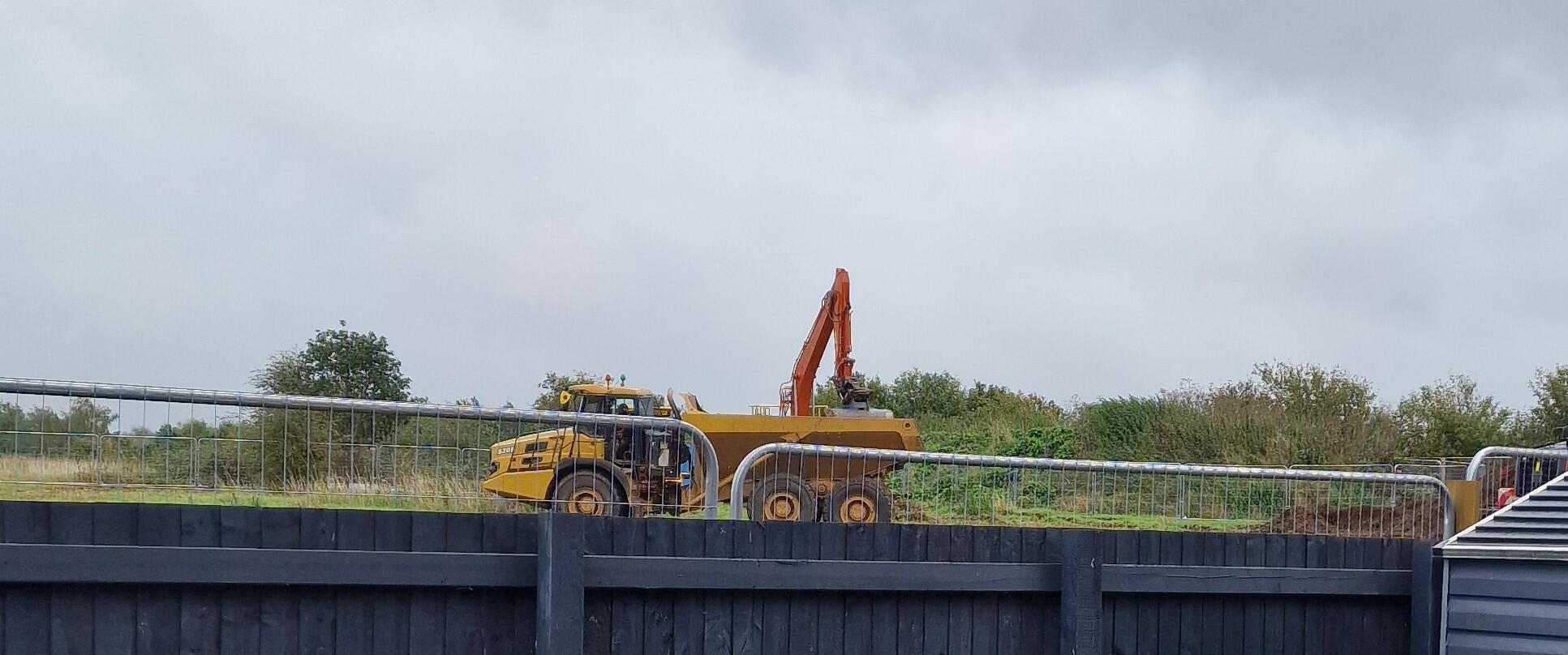
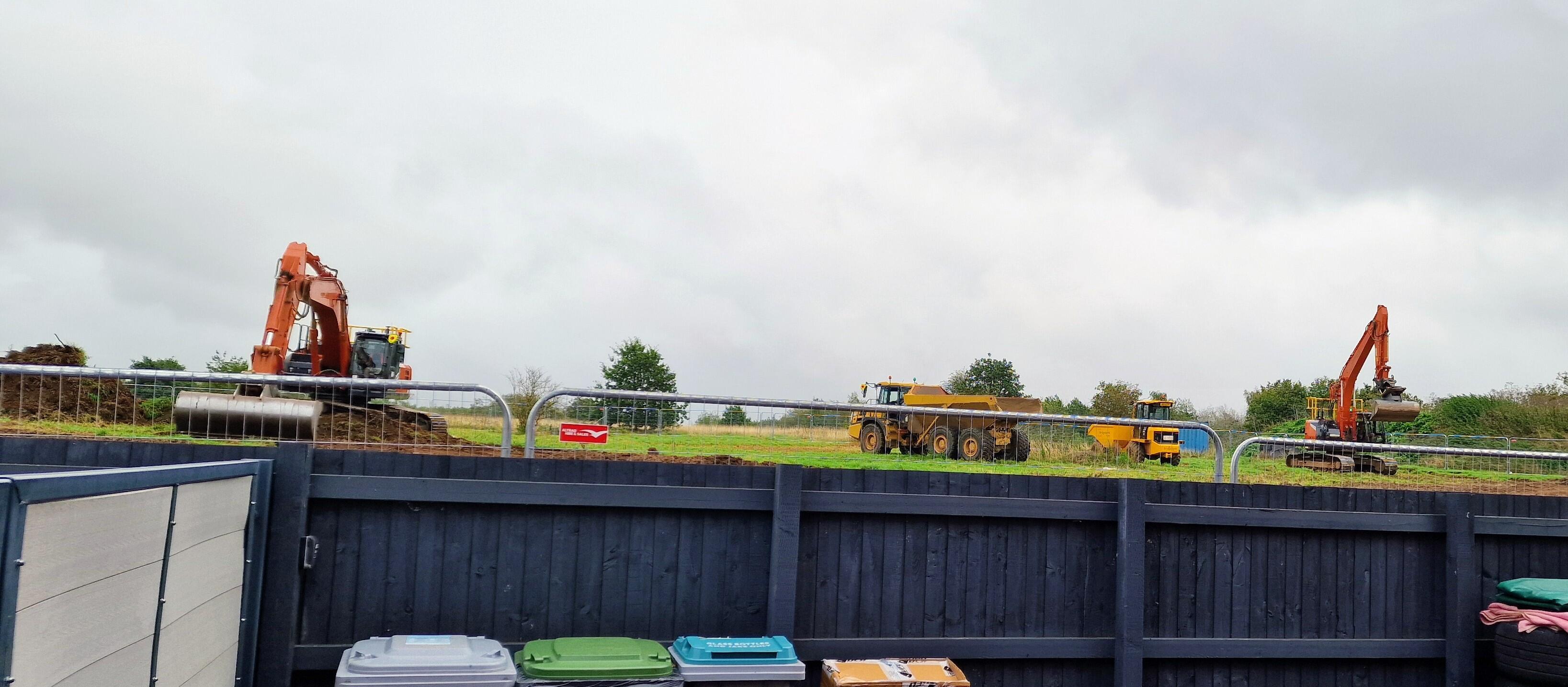
 3 points3 pointsAnyone who wants his services now would have to pay an enormous amount of compensation to Notts for this level. Seeing that he's a promotion winner & changed the way the side plays & it's worked out perfectly so far, could be attractive to other clubs, but it will cost them. Transfer fee/compensation for Head Coaches is becoming more common nowadays, so I'm sure the Notts owners are shrewd enough to already have prepared for any possibility.3 points@Fan of Big Tone Cruise along with Tone is now Spa along with Tone. In realityI only get to the Spar supermarket🤣3 pointsBooked Christmas market trip to Lille on Eurostar on their £35 offer deal. Looking forward to that3 pointsWe only seem to interview a player after a game we have won. I can’t remember the last time we interviewed one when we lost. Other clubs do. Is it because they might reveal what was said in the dressing after the game?3 points3 pointsI'm looking forward to the return of this class player, who should be a County legend but strangely isn't. 0-2 down to Boreham Wood, we needed one of our best players to step up and say 'no, we're not losing today, we didn't battle Wrexham all year and get 100 pts for nothing'. I genuinely believe nobody else was going to do it. Unfortunately, many Notts seem to think his 2 goals were some sort of fluke or statistical quirk when it was really a Championship-level player stamping his will and class on the situation in hand. Without his intervention? Who knows? We certainly would've lost to Boreham Wood. Maybe Luke Williams would still have moved on the next season, having made his name. Maybe the Bros would've even left, facing a 5th year in the National League. Baldwin was heroic that day, and made sure the course of Notts' history was put back on track. American sports fans seem to have a better appreciation of the of the stars who make the difference at the crucial moments. Fans in England soon forget. In my book, what Baldwin did that game made him 'a made man' and key figure in our recent history. Then came the following season and the breakdown of Luke's playing system when he lost his entire central midfield and quickly after that, his departure. During that period, and with the loss of control, Baldwin, Cameron, Brindley, Rawlinson, Slocombe et al came under pressure they simply couldn't withstand, although we tried in vain to play the same way. So we plummeted from top, and still close to top in December to 14th. This should have been understood, and Baldwin's heroics remembered. He should never have received the flak that he did from some quarters. Yes, he was, and probably still is, a maverick kind of character, but as I said 'a made man' in terms of the clubs history. Old geezers shouting about mistakes should've been told to stfu! :) Arguments of his worth that went on at the time were settled in the usual way - by tracking what happens to a player afterwards. Predicatbly, the detractors were quickly proved wrong. The next season he's promoted to L1 as a key regular in Bradford's defence. Then takes them to the play-offs in his first season back in L1 and that's where they sit now, with Aden getting rave reviews about his performances. As we'll probably be reminded tomorrow, he's a fantastic player to watch. Unbelievably fast and comfortable on the ball with that distinctive upright running style. Just a really classy player, even for this level. I wonder what reception he'll get tomorrow. And how will he respond? It's a similar case to Cameron, who isn't at the same level, and I wouldn't blame him if he felt bitter about the way it ended at Notts. But hopefully he'll realise that there's a section of the fanbase that understands how good he was and what he did for us when the chips were down.3 points@Fan of Big Tone have a lovely break and enjoy the Lincoln lunch. 👌 @nottsnutter get stuck into them chores, and the nightmare of buying grandchildren presents for the dreaded day. That's funny as it's also the lowering of the ears ceremony for me too, ready for Lanzarote Thursday. Enjoy Reading on Saturday. 🥳 @Chris what is Jake studying for at Uni? Give super my best wishes when you chat to him please. Apple 🍎 crumble is my absolute favourite pudding, don't forget to save one for me please 😋 curries are very nice also 🥘 As for me, no sunshine, a little drizzle and this 👎 They have started the process of preparing the ground for all the infrastructure to be put in. The noise is rather loudish and getting on ones wick already. Happy Days ahead me thinks 🤔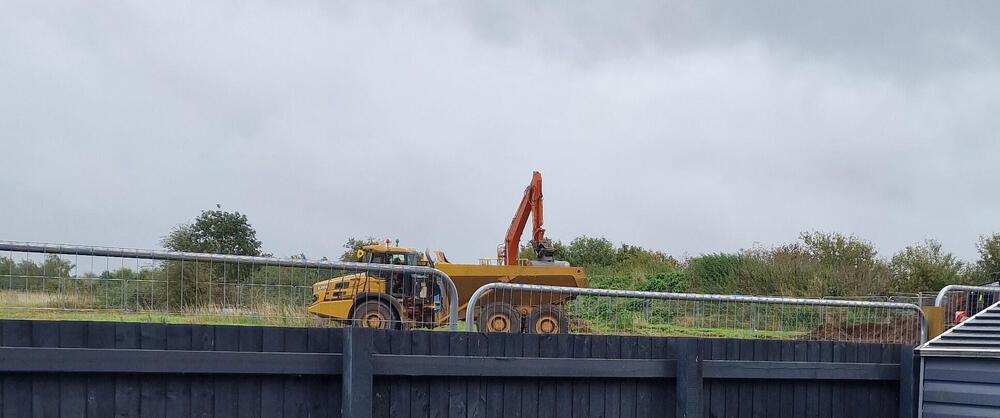
 3 pointsThere isn’t much happening for me. Jake has returned to uni; it's his final year before graduation. I need to speak with Super at some point today, and I hope to find time to prepare some meals for him. Kate's nana gave us a lot of cooking apples, so they will be turned into apple pies or crumbles. One other thing I aim to look into is making some homemade curries for him, as he does like them and I think they'd help keep him warm.3 pointsYeah, Tsaroulla probably spent the weekend asking himself, what the hell just happened there. He didn't have his best game by any stretch of the imagination, but the number of times he was isolated and left with two markers isn't the way we play. In our 3-4-2-1, the wide defenders have to join in and get forward to create the overload - there are 2 holding mids and the defence can slide over to cover. Hopefully this is a wake-up call for Pato and Gibbons for home games. If Gibbons can't get close to support our RWB, and sometimes make runs ahead of him, we should pick someone who can. We'll need a points haul from home games that's going to take more positivity and risk-taking than that.3 pointsIt's disappointing to lose as I felt we had the edge in the first half, albeit without creating many chances. Bradford started the second half more aggressively and their goal seemed to knock us out of our stride. We CAN create lots of chances - witness Burton at home last week - but this weekend we had stronger opponents plus the precision was lacking at times. At times you can see the players aren't yet used to playing together, particularly when we had that three-on-three break and were unable to carve out a chance despite the three Bradford players almost standing on top of each other. Oh, and the last-second equaliser didn't look offside to me. But that's the way it goes sometimes, let's beat Reading instead.3 points3 pointsHe will always be a Notts Hero for helping us to return to the football league, but when a player decides to leave for whatever reason we move on. We could talk about dozens of players that we've cherished over the years that have come and gone. Defenders like Needham, Kilkline & Short. They were class defenders that were a level above Baldwin. They all left for pastures new, but Notts moved on. Under Martin Paterson we are much more defensively secure compared from when Baldwin played for Notts. Our style has changed & we now have players that fit that style. Ness, Platt, McDonald & Bedeau are better defenders in my opinion, so I think that Notts are in a good place defensively at this time. We just need to score more goals when we get the opportunity.3 points3 pointsGreat post @theAnticlough 👏 For those like me with short memories here is the footage.3 points3 pointsPONdle #12 — X/6 — 5 letters ⬛⬛⬛⬛⬛ 🟨⬛⬛🟨⬛ ⬛🟨🟨⬛⬛ ⬛⬛🟩🟨⬛ ⬛🟨🟨⬛⬛ Play PONdle I’m really struggling with this, can someone send me a personal message with the players name to put me out of my misery. @nottsnutter @Graham3 pointsFinneran for me as well. When the team is not playing well it's the players with real class that stand out. As has been said before, only 4 starters in the team that beat Salford at Wembley. The team needs time to gel. I like the look of Mustapha, Kanu and Longelo. Generally, we need to show a bit mor composure on the ball rather than just panic first time punts up front to no one in particular. That's why Finneran gets my vote his composure to keep the ball and make the right pass is amazing for such a young player.3 pointsI think Evans and Lipusuic also contributed, particularly in the 1st half. Don’t agree about Longelo being the best if the subs, he got more of the ball than the others but looked a bit clumsy and ineffective tbh. Kanu’s touch, agility and energy was more encouraging for my money. MOTM was a close call, Finneran was creative and he knocks the ball about like a seasoned veteran but Cooper was his usual busy, industrious self. He wins the ball and moves it forwards swiftly. Every aspect of his game oozes class. His passing was less accurate today but that seemed to be because we were slow out of the blocks in the 2nd half anyway and totally disjointed once Evans & Lipusuic departed. I’d just give MOTM to Finneran because he just looked the most composed throughout. Roberts offered absolutely nothing, (and I’m his biggest cheerleader normally), and Mustapha, dazzling tho’ he may be at times, was dreadful in the 2nd half, he barely touched the ball tbh & disappeared without trace!3 pointsI thought Mustapha played really well and I was surprised when he was subbed but I’ve got to agree with the votes so far and the sponsors man of the match, I’m voting for Finneran for a young man he shows lots of promise, he never looks flustered, he’s a great signing.3 pointsWe played some lovely stuff in the first half but the second half we just couldn’t seem to get going. The reality is we are going to lose matches in this division, Bradford deserved their win and we go again next week.3 pointsWe looked decent in the first half but we only created one worthwhile chance. I thought we played well enough to have led at half time. They came out in the 2nd half on the front foot and we didn't look the same side. I would have swapped Evans for Grant at the start of the 2nd half & gave the side 20 minutes before making any more changes. We looked disjointed after Roberts, Kanu & Longelo came on. I think that this is a game where lessons have to be learned. Bradford play in a similar way to Notts, but they did it much better than Notts in the 2nd half.3 pointsVery disappointing second half, disjointed and ineffective. One problem throughout the match was the absence of any combination play between Tsaroulla, Gibbons and Cooper down our right. Tsaroulla in particular had an absolute stinker, although you can't blame him for all the times he was marked by two with no support. Last season Macari and Tsaroulla developed a great understanding, and with Iorpenda. We need to find something similar this season. While we're waiting for Macari, Gibbons has to play more football.3 pointsMorning everyone and especially you @Fan of Big Tone my thoughts and prayers are with you today and it hope everything goes as well as it can. Today is the 25th anniversary of 9/11 where the twin towers in New York were destroyed and nearly 3000 people lost their lives. 343 members of the New York City Fire Department (FDNY) died on 11 September 2001 while responding to the World Trade Center attacks. One small distinction is worth making: the 343 figure is FDNY members, and the detailed breakdown recorded at the time was 341 firefighters and 2 FDNY paramedics. There were also 71 police officers and 8 private EMS personnel/paramedics among those killed at the World Trade Center. Sadly, the death toll for firefighters and other responders continued to rise in the years afterwards because of cancers and other illnesses linked to exposure at Ground Zero. The FDNY now reports that more than 400 members have subsequently died from World Trade Center-related illnesses. My thoughts and prayers are with all the families and friends on this sad day of commemoration. 🙏3 points2 pointsFirst and foremost, this is excellent news for Martin Paterson. He remains a very young manager and relatively inexperienced as a number one, so this backing from the ownership group is a significant vote of confidence. After a year in the role, the Reedtz brothers have clearly seen enough to believe that Paterson is more likely to leave for a bigger opportunity elsewhere than to be relieved of his duties. Of course, it does not guarantee he will stay long term, but the decision feels entirely consistent with the way the Reedtz brothers have always operated. Their approach is measured, evidence-based and rooted in careful risk assessment rather than short-term emotion. As supporters, we are fortunate to have owners who act as thoughtful stewards of the club, making decisions with both ambition and sustainability in mind. Paterson is the fourth head coach they have appointed and, viewed purely from a business and financial perspective, their record stands at two clear successes and one failure. With Burchnall and Williams they created value; with Maynard they didn't. That may not sound spectacular on paper, but in an industry where managerial appointments are so often expensive mistakes, it compares very favourably with most clubs I can think of.2 points2 pointsExcellent news. We know he's good but he might be double-promotion good.2 points2 pointsGood news, I think! He's done a fantastic job for us and deserves this. But I've got my cynical hat on today - Preston have sacked their manager and Burnley are bottom of the table, both former clubs of his. Is this a Langstaff-style extension - designed to get us a good fee if/when he moves on?2 pointsWell a good start to our break away, we love the hot tub.
 2 points2 pointsPONdle #13 — 3/6 — 8 letters ⬛🟨⬛🟨⬛⬛🟨⬛ ⬛⬛⬛🟨🟨🟩🟨⬛ 🟩🟩🟩🟩🟩🟩🟩🟩 Play PONdle2 pointsNot really worried either way as not sure they are going to say what we all saw on Saturday, that is, that Bradford we're the better team. Not that much better but second half their L1 experience and knowhow told. We got a bit out muscled in the middle of the park. Be good to get Robertson back as an option. Bit disappointed in Mustapha and Roberts but thought Smyth has improved a lot since the Leicester game. Quite liked Kanu too. It's going to be a tough October and a tough season but I feel well have enough to survive. The 2 week break may be just what we need to reset.2 pointsIn the second half we never really clicked for some reason, our short passing was poor and the direct passing even worse. We kind of got dragged into a slogging battle with Bradford as the match went on, with the last 20 being the worst of it. Bradford were just happy to whack it long and we just kept giving it back to them. The Powell v Ness battle, where they were both as bad as each other to be fair, was erm, something. I thought we really struggled out wide and agree with @theAnticlough about the right-hand side being worse off. I can’t put my finger on it but my guess is that Bradford prepared for the inverted wingbacks better than the other opposition so far, because they really stifled us here. I wanted Tsaroulla to go at Touray more especially after he got booked early on, but we proceeded to put very little pressure on him for the rest of the match. As for the last 30 minutes or so, I actually thought we looked worse with two upfront, because it made us play more direct and we didn’t do it effectively, instead of playing balls in behind/into the channels we just kept forcing Kanu and Smyth into duels. We were also limited in the middle of the pitch and that is just through injuries. I get why Cooper was dropped deeper but I think he’s much better higher up the pitch. I think with either Robbo or Palmer alongside Finneran we’d have been able to get a bit more control and we’d have been more dangerous with Cooper higher. There still wasn’t much between the sides, it wasn’t a great match, I think if that gets played another 9/10 times in that way it finishes 0-0.2 points2 pointsAll the players who dragged us out of the National League are heroes in my book, that season and in particular that day against Boreham Wood were pivotal to our club. Although I don't believe the brothers would have given up on us, it was our fourth NL season after all. We remodelled our defence when he left and upgraded massively, which built the foundation for our later success.2 points2 pointsCouldn’t agree more @The Anti-Clough, will always be a Notts hero in my book, a class player and never understood why was allowed to leave, thought he was someone to build a defence around. Still amazed by the sound generated by his header from Jones cross2 pointsGood question. They used to. Many fans like to consume as much content as possible. Hopefully, they'll restart some day2 points2 pointsWell we competed well against a quality outfit at this level. There was a drop off in the second half and Bradford took advantage.2 points2 pointsPONdle #11 — 2/6 — 12 letters ⬛🟨🟨⬛⬛🟨⬛⬛🟨⬛⬛⬛ 🟩🟩🟩🟩🟩🟩🟩🟩🟩🟩🟩🟩 Play PONdle2 pointsLooking forward to the match, I’m not keen on these 12.30 kick offs though. It’ll be a great atmosphere as Bradford are bringing a huge following. Let’s hope the players show the same work ethic and desire that we’ve seen up to now, if they do there’s no reason we can’t win this one. COME ON YOU PIES!2 pointsThis is a really interesting one. Notts County v Bradford City at Meadow Lane tomorrow has the makings of a very close game. My gut feeling is Notts can win it, but I wouldn't expect an easy afternoon. Bradford are the sort of side who can make it physical and frustrate us. My prediction: same as you @Robbie Notts County 2–1 Bradford City. And knowing County, I wouldn't be surprised if they make us sweat right to the final whistle! 😄 COYP2 pointsI think that the Notts squad has progressed to another level since that start of the 26/27 season. The players are completely behind Martin Paterson's his footballing style & work ethic. The playoff games last season was a taster for things to come but I do believe the Notts recruitment over the summer that was sure to have Paterson's imprint all over it, has taken Notts to that higher level. I'm beginning to come to the idea that Paterson could possibly finish up being Notts County's best Head Coach/ Manager since Warnock if the continuous improvement continues. I do hope that it does.2 pointsThis leaderboard is set to London/GMT+01:00





Important Information
Pride of Nottingham uses cookies to ensure you get the best experience on our website. To approve, simply continue using the site or click 'I accept' Terms of Use.